
Model to download · Word and PDF
Before submitting your work, identify what the evaluator will not find in your technical report
Grid for self-revision of the technical report
Before filing, note in your technical file the answers that the evaluator will not find and the claims without evidence. A Word template to fill out on your file, with an example filled in and a checklist before filing.
What the grid contains
A five-step guide, To be followed with your consultation fee, your written report and your open attachments.
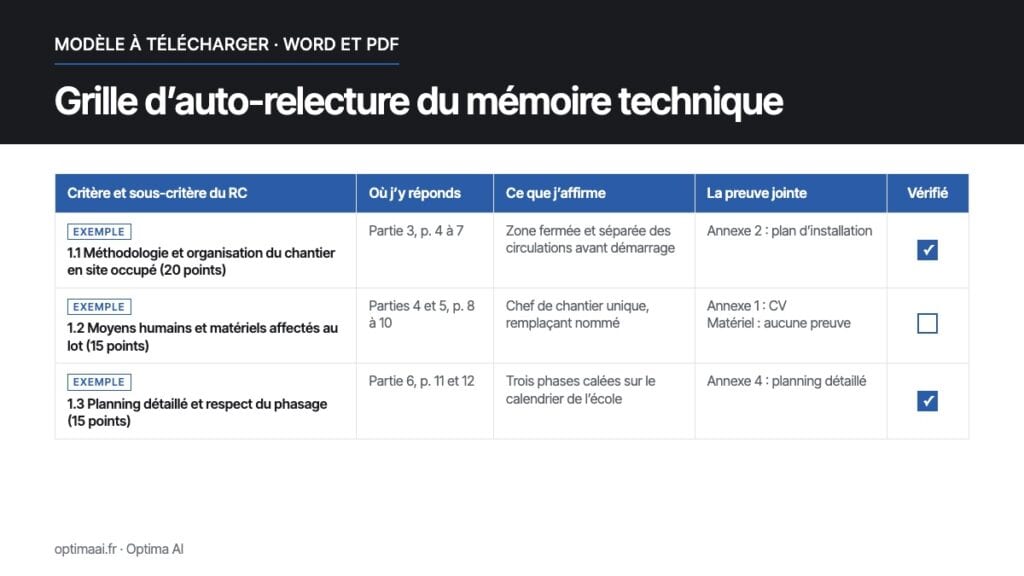
A table to fill out the criterion and sub-criterion of the regulation with their weighting or order (if any), where you answer them, what you claim, the attached evidence, a «Verified» box.
A full example on a set of windows in use, that of our example of technical memory discussed, with a line left unchecked to show what is being corrected.
A checklist before filing Form, consistency with the DPGF or the BPU, cited annexes, number of pages, signatures.
The useful articles of the Public Procurement Code, with their link Légifrance.
Receive the grid by email
For whom
Companies that respond to public or private tenders: BTP, training, IT services, cleaning, and any profession where a technical report is required. For the person who writes the tender as well as for the person who reads it before submitting it.
A tool to help with the review, to adapt to each consultation; it does not guarantee a grade.
Frequently asked questions
Why does the grid not contain the buyer's criteria?
Because they change from one consultation to another: each buyer sets his own in the documents of his consultation, most often in the settlement of the consultation. The grid allows you to reflect your own, as they are written, with their weighting or order of importance.
Is it also suitable for a private market?
Yes. Refer to the criteria that the client announces in their consultation. If they don't announce any, refer one by one to the written expectations of their specifications, or ask them how the offers will be compared.
When should it be used?
When your memory is complete and organized, before the final review, to have time to make corrections. The checklist is done just before submission. You can also fill in the first column right after reading the consultation file: it gives you the plan of your memory.
To go further
Example of BTP technical memory for a tender, commented paragraph by paragraph ›
 French
 English